

Frequently Asked Questions
How do I change my payment method?
You can change or unregister your payment method in the following way:
(1) Log into the Mog Station (https://www.mogstation.com) with the Square Enix Account that you used to play FINAL FANTASY XIV.
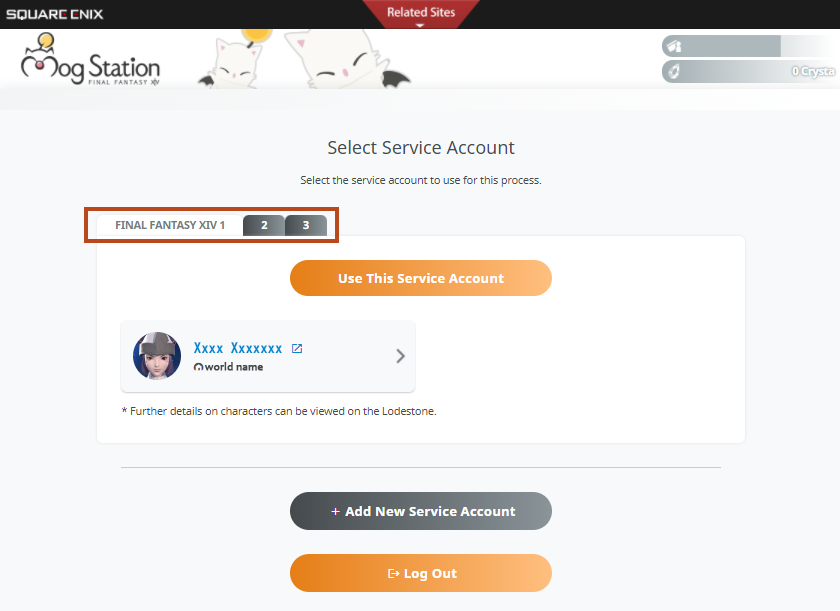
* If you possess multiple service accounts, you will be taken to the service account selection screen. Please carefully navigate through the tabs and select the correct service account you intend to redeem the Game Time Card on, then select "Use This Service Account."
(2) Under "Square Enix Account Settings" on the left hand side of the screen, select "Register/Update Payment Method."

(3) Select the appropriate payment option then follow the on-screen instructions to complete the process.


* Please note, if you have an active recurring subscription, this will not update the payment for that subscription. If you wish to change the payment method for a subscription, please first cancel any active subscription, unregister any payment methods under "Square Enix Account Settings" → "Register/Update Payment Method" and then add a new subscription.
You will not lose any game time for canceling a subscription before a subscription ends.
If you are playing the Xbox Series X|S version only, the only accepted payment method is FFXIV Coins for the Xbox Series X|S version. Game cards cannot be used.
Likewise, if you are using the Nintendo Switch™ 2 version, the only accepted payment method is FFXIV Coins for the Switch 2 version. Game cards cannot be used.
Likewise, if you are using the Nintendo Switch™ 2 version, the only accepted payment method is FFXIV Coins for the Switch 2 version. Game cards cannot be used.
FAQ Article: 68088
FAQ Category: [Service Fee] / FAQ Sub-category: [Payment]
FAQ Category: [Service Fee] / FAQ Sub-category: [Payment]
| Return to TOP |