

To purchase FFXIV Coins on the Microsoft Store, you must use the same XBOX account that is linked to the Square Enix account you use to play FINAL FANTASY XIV. After purchasing FFXIV Coins from the Microsoft Store, be sure to launch the XBOX Series X|S version of FINAL FANTASY XIV and log in. Purchased FFXIV Coins will not be credited to your Square Enix account until you log in to the game.

Knowledge Base Search
KB Article: 82615
KB Category: [Service Fee]
KB Sub-category: [Payment]
What are FFXIV Coins?
FFXIV Coins are a currency exclusive to FFXIV that can be purchased through the Microsoft Store or Nintendo eShop and redeemed on the FINAL FANTASY XIV Online Store for optional items, and on Mog Station for game subscriptions and additional services.
Please note that FFXIV Coins are treated as separate currencies between XBOX Series X|S and Nintendo Switch 2 and are not cross-compatible.
* Please make sure the firmware on your Nintendo Switch™ 2 console is up to date before taking the steps below.
To purchase FFXIV Coins on the Nintendo eShop, you must use the same Switch 2 user profile that is linked to the Square Enix account you use to play FINAL FANTASY XIV. After purchasing FFXIV Coins from the Nintendo eShop, be sure to launch the Nintendo Switch 2 version of FINAL FANTASY XIV and log in. Purchased FFXIV Coins will not be credited to your Square Enix account until you log in to the game.
*Please note that you cannot purchase FFXIV Coins via web browser.
In addition, the region of the Nintendo eShop that you purchased a FINAL FANTASY XIV product or FFXIV Coins must match the region of your Square Enix account. If the regions differ, an error like the one below will be displayed and you will not be able to use the product or FFXIV Coins.
-----
ERROR
No valid service account is available to play FINAL FANTASY XIV.
In order to play FINAL FANTASY XIV, you must purchase the Nintendo Switch 2 version from Nintendo eShop.
-----
For information on which countries and territories are supported by each Square Enix account region, please refer to this article.
You can check your FFXIV Coins balance by logging into the Mog Station or the Online Store.
If your FFXIV Coins balance is not displayed, please switch to either XBOX or Nintendo Switch 2 mode.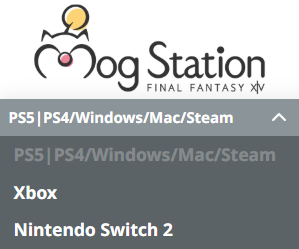
FFXIV Coins are deposited to your Square Enix account when you log in to the game. After purchasing FFXIV Coins from either the Microsoft Store or Nintendo eShop, be sure to launch the corresponding version of FINAL FANTASY XIV and log in.
If your FFXIV Coins are not deposited after logging in, please verify that the region of your Square Enix account matches the region of the XBOX account or Nintendo Switch 2 user profile used to purchase the FFXIV Coins.
FFXIV Coins purchased from the Microsoft Store or Nintendo eShop cannot be used with a Square Enix account registered to a different region.
If you continue to experience issues, please contact the Square Enix Support Center and provide any error codes you may have received by clicking the "Additional Assistance" button at the bottom of the page.
For players using only the XBOX Series X|S version or Nintendo Switch™ 2 version of FINAL FANTASY XIV, FFXIV Coins are the only available payment method.
If your Square Enix account has a license for the full version of FINAL FANTASY XIV on any platform other than XBOX Series X|S or Nintendo Switch 2, you may use payment methods other than FFXIV Coins through the Mog Station or FINAL FANTASY XIV Online Store website. However, Nintendo Switch 2 subscription fees can only be paid using FFXIV Coins.
Please note that when your account is set to XBOX Series X|S or Nintendo Switch 2 mode on Mog Station or the FINAL FANTASY XIV Online Store, FFXIV Coins are the only payment option available.
If payment methods other than FFXIV Coins do not appear on Mog Station or the Online Store, please select "PS5|PS4/Windows/Mac/Steam” to switch modes.
If you are unable to switch, please try accessing the website via a web browser on a PC or smartphone.
